Apple iPhone 13 128GB


£30.00 a monthNo upfront costMonthly cost will rise every April by inflation (CPI) plus 3.9%.
£720.00 total cost
300 GBof 5G data
24 month contract
Promoted
via Fonehouse


£30.00 a monthNo upfront costMonthly cost will rise every April by inflation (CPI) plus 3.9%.
£720.00 total cost
300 GBof 5G data
24 month contract

£39.00 a month£29.00 upfront costMonthly cost will rise every April by inflation (CPI) plus 3.9%.
£965.00 total cost
300 GBof 5G data
24 month contract

£59.00 a month£59.00 upfront costMonthly cost will rise every April by inflation (CPI) plus 3.9%.
£1475.00 total cost
Unlimited5G data
24 month contract
Uses Three's Network


£29.99 a month£19.00 upfront costMonthly cost will rise every April by inflation (CPI) plus 3.9%.
£738.76 total cost
100 GBof 5G data
24 month contract
Uses Three's Network
£35.99 a month£19.00 upfront costMonthly cost will rise every April by inflation (CPI) plus 3.9%.
£882.76 total cost
100 GBof 5G data
24 month contract

£46.00 a month£39.00 upfront costMonthly cost will rise every April by inflation (CPI) plus 3.9%.
£1143.00 total cost
Unlimited5G data
24 month contract
Uses Three's Network
£25.99 a month£9.00 upfront costMonthly cost will rise every April by inflation (CPI) plus 3.9%.
£632.76 total cost
100 GBof 5G data
24 month contract
Uses Three's Network
£29.99 a month£119.00 upfront costMonthly cost will rise every April by inflation (CPI) plus 3.9%.
£838.76 total cost
100 GBof 5G data
24 month contract
£37.00 a month£39.00 upfront costMonthly cost will rise every April by inflation (CPI) plus 3.9%.
£927.00 total cost
300 GBof 5G data
24 month contract
Uses Three's Network
£27.99 a month£9.00 upfront costMonthly cost will rise every April by inflation (CPI) plus 3.9%.
£680.76 total cost
Unlimited5G data
24 month contract
Uswitch services are provided at no cost to you, but we may receive a commission from the companies we refer you to. If a deal is "promoted" on Uswitch's tables, then it has been lent additional visibility as a result of us securing exclusivity on a great deal, or a commercial agreement to showcase what we believe to be market-leading value to consumers. Learn more about how our site works.
Please note: Mobile networks may increase monthly prices in line with the retail or consumer price index each year during the length of your contract. Please refer to individual network's terms and conditions before signing up.
Apple's iPhones are renowned for their great looks and sleek design, with Apple consistently topping the polls as a customers' favourite smartphone brand.
Here's how you can find some of the best iPhone deals in the UK, so you can compare to see which iPhone is best for you.
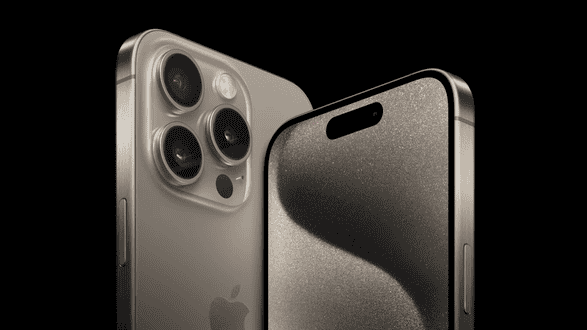
iPhones are undeniably top level smartphones, but they do come with high prices to match. However, there are some great iPhone deals to be found depending on which model you're keen to get and the service you want.
The iPhone 15 range features four new handsets with the most-advanced specs available in an iPhone. The iPhone 15, iPhone 15 Plus, iPhone 15 Pro and iPhone 15 Pro Max were all announced at Apple's annual launch event last year and feature all of its latest technology, including USB-C charging, 48MP cameras across the range and a new titanium casing in the pro models.
Timing is also a big factor when it comes to getting the best iPhone contract deal for your money. A great time to look for deals on both the iPhone 14 and iPhone 13 range was straight the launch of the new iPhone 15.
If you're not too bothered about owning the latest and greatest iPhone, the best period to buy an existing model is in the few months after the new iPhone is out. It's around this time that networks discount existing iPhone handsets to clear stocks.
However, be aware that Apple discontinues both of its Pro models from previous ranges when the new one is launched. So if you want the iPhone 14 Pro or the iPhone 13 Pro, your best bet is to shop from a network.
See all our latest iPhone deals above from some of the UK's top mobile networks.
Below, we take a look at the biggest UK networks offering iPhone contract deals and outline their key advantages.
Advantages of choosing an O2 iPhone deal include:
Compare O2 iPhone deals on Uswitch.
Some of the reasons to choose an iPhone pay monthly deal on Three include:
Compare Three iPhone deals on Uswitch.
Pick up an iPhone deal with Vodafone and you’ll receive:
Compare Vodafone iPhone deals on Uswitch.
Pick up an iPhone on BT Mobile and you'll get:
Compare BT Mobile iPhone deals on Uswitch.
Pick up the iPhone on giffgaff and you'll get:
Compare giffgiff iPhone deals on Uswitch.
Since the launch of the very first iPhone, every year has brought with it an updated model.
Here we’ll explain the differences between the different editions and outline their key specifications.
The new iPhone 15 is the entry-level handset of the iPhone 15 range. As always it has top-quality specs in the form of a superb 6.1-inch OLED screen, a camera setup with a new 48MP main camera, and the new USB-C connection.
The 2023 selection of iPhones has included two Pro models - the iPhone 15 Pro and the iPhone 15 Pro Max. These two handsets have had the most upgrades, namely in the shape of the new A17 Bionic chip, a periscope telephotos camera with 3x and 5x optical zoom, and a new titanium finish.
The iPhone 15 Pro Max has a 6.7-inch OLED display, compared to the iPhone 15 Pro's 6.1-inch display.
The iPhone 15 Pro and iPhone 15 Pro Max also both have a dynamic island, ProMotion technology with adaptive refresh rates up to 120Hz, and up to 1TB in storage.
The iPhone 15 Plus joins the regular iPhone as the entry point into the range, but increases the screen size to match the Pro Max. The iPhone 15 Plus has the same specs and features as the iPhone 15 but with a 6.7-inch screen.
The iPhone 15 range's prices start at £799 for the iPhone 15, £899 for the iPhone 15 Plus, £999 for the iPhone 15 Proand £1199 for the iPhone 15 Pro Max.
The iPhone 14 is the standard model of the iPhone 14 range, but that doesn't mean it's a run-of-the-mill smartphone. A stunning 6.1-inch OLED screen has now been boosted to a 120Hz refresh rate and the camera has some exciting new upgrades including macrophotography and cinematic video recording.
The main difference between the two models is the camera – which is 48MP on the iPhone 15 and 12MP on the 14 – and also the price. You just need to decide if you want a higher resolution camera sensor or a cheaper handset.
The iPhone 14 range's prices start at £699 for the iPhone 14 and £799 for the iPhone 14 Plus. The iPhone 14 Pro the iPhone 14 Pro Max are no longer available directly from Apple, but there are plenty of contract deals still on offer from UK networks.
Although it's a few years old now, the iPhone 13 is still an excellent quality smartphone. While it doesn't have a number of the newer, flashy features such as dynamic island or 48MP cameras, it's significantly more expensive than the iPhone 15.
Author: Nick Baker
Last updated: 15 April 2024